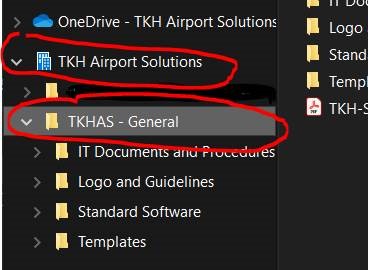


We would like to use our Company Cloud environment for shared folders for a team in Teams . Within a team you can share general data and files with your team, we also do the same for the team “TKHAS”. Everyone is a member of this team. Here you will find folders with useful documents, templates and assets that all TKH AS employees across the 3 locations have access to.
For Windows users, the shared folders will be accessible from your regular Explorer. You only need to perform a few simple steps as outlined below.
1. Go to MS Teams, and in the left main menu, click on ‘Teams‘
2. Click on the team called TKHAS

3. In the top, click on Files
4. Click on Sync

When performing these steps for the first time, OneDrive should create a new location in your Explorer called TKH Airport Solutions, containing 1 folder called TKHAS-General or Teamsite – General.
In this folder you will find IT documents and procedures, Logo and guidelines, Standard Software and Templates.