


There are specific risks associated with the use of e-mail. Remember that the confidentiality of information within e-mails sent to external recipients is not guaranteed by default and therefore it may be read by others not authorized to see it.
Prevent unwanted emails
Do: Use your work e-mail address only for work-related matters.
Don’t: Place your work e-mail address on non-work-related sites and give out your work e-mail address without reason.
Sending e-mails
Check whether you are sending the right information to the intended recipient(s) before sending e-mail and be aware of the e-mail ‘history’, particularly when forwarding an e-mail. Do not include business information in a private e-mail.
Receiving e-mails
Never open attachments or links in e-mails from unknown or suspicious sources or unexpected e-mails from known sources. Be careful with all messages that you receive, even if they come from trusted organizations, and don’t just click on links in those messages. Never reply to uninvited incoming e-mails (spam).
Phishing e-mails
Phishing e-mails are e-mails that are pretending to be genuine but are actually sent by (internet) criminals. The e-mails may appear to be from familiar organizations (e.g. your bank or from the IT-department) where you may be asked to supply your password, pin code or other personal information on a website. Don’t share your personal data.
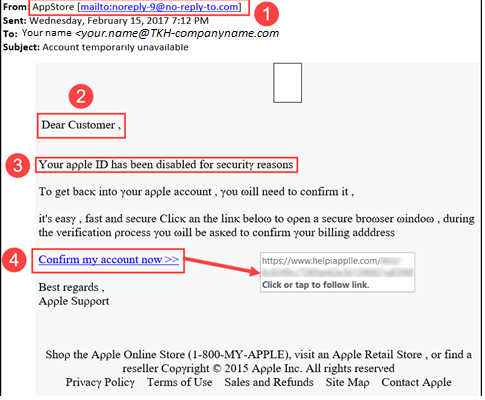
How you can recognize a phishing e-mail:
– The sender’s e-mail address is vague or is derived from a real company name or the name of an authority.
– The “From” and “Reply to” email addresses differ.
– The greeting is “Dear Sir/Madam” or “Dear Customer.”
– One is asked to “check personal data,” “update” or “fill in.”
– Usually the e-mail states an urgent reason for action.
– The sender (mostly the so-called CEO) emphasizes that confidentiality is very important and to not share it with the colleagues.
– The payment order is given as an order (from an authority e.g. Tax, CEO, Manager, etc.).
– One is asked to click a link that goes to a fake website where one’s login credentials are requested.
– One is asked to click a link that – without clicking – points to a completely different (fake) website.
Click on the link below to download issue 6 of the TKH IT Security Newsletter. This issue focuses on the risk of e-mail.
Any questions on this, please contact Albertie Boeijink